Knowledge base
How Strut.ad works under the hood
Here we explain, without hand-waving, every process we run on your brand: how we read your website, how we build the context the AI receives, how we generate copy, images and video, what we check before showing you anything, how we publish, how we measure what works and how we attribute sales to each post. With the system’s real numbers, as they stand today.
Last reviewed: September 2026. When a limit changes in the product, it changes here.
The journey of a post, from start to finish
Every post follows the same path. This is the map; the rest of the page details each stop.
- Your website becomes a brand profile: We crawl up to 12 pages of your site, extract logo, colours, products and copy, and an AI fills in a 42-field profile that you can correct.
- The calendar decides when it is due: One rule per network (weekly, fortnightly or monthly) sets the day and the time. The post is generated ahead of time, 7 days before by default, so you have room to look at it.
- We build the context: The brand profile, your documentation, the posts you approved or rejected, the commercial calendar and what we learned from your metrics are arranged into nine layers with a clear priority.
- We pick an angle that does not repeat: We look at your last 18 pieces on that network and choose the least-used goal, angle, hook and visual treatment.
- The AI writes and illustrates: Different copy per network and an image generated from your product. On the Studio plan, also a vertical reel of up to 30 seconds, assembled scene by scene, voiced in your brand's language.
- Two filters before you see it: A deterministic check on the copy (repetition, clichés, made-up figures, banned vocabulary) and a visual review of the image or the video.
- You approve, edit or reject: From the web or from Telegram or WhatsApp. You can ask for changes in your own words and keep whichever version you prefer.
- It is published and measured: We publish on each network through an authorised provider, without your passwords. Then we read the real metrics, and whatever works best weighs more in the next post.
Website scan and brand profile
It all starts with your website address. We do not ask you to fill in forms: we read what you have already published and hand it back to you, organised, so you can correct it.
What we extract from your website
- The brand name (from the title, the social metadata or the main heading).
- The logo, looked for in a cascade of usual places: structured data, the site icon, images with "logo" in the filename, the header, the link to the home page. Anything belonging to third-party plugins is discarded.
- Dominant colours, reading up to 3 style sheets from your site and discarding pure whites and blacks.
- Products: we recognise Shopify, WooCommerce, Magento and Prestashop, plus generic structured data. If we find none, we try a looser method.
- Semantic sections: about us, services, team, testimonials, frequently asked questions, case studies and pricing.
- The footer (taglines and postal address), links to your social profiles and additional images: product, team, premises and gallery.
| Pages crawled | Up to 12 per scan, prioritising "about us", services, team, case studies and pricing over the blog. |
|---|---|
| Text kept | Up to 80,000 characters in total and 8,000 per page, cut at a sentence boundary. |
| Images | Maximum 5 MB each; PNG, JPEG, WebP, GIF and SVG only. They are stored on our server, under your company. |
| Discovery | The sitemap and robots.txt first; if neither exists, we follow the internal links of the domain. |
| JavaScript-heavy sites | If the page returns too little text or the server blocks us, we can open a real browser in an isolated process, with a 60-second limit. |
| Frequency | You can re-scan whenever you like, up to 5 scans per hour. |
Type of business and tone of voice
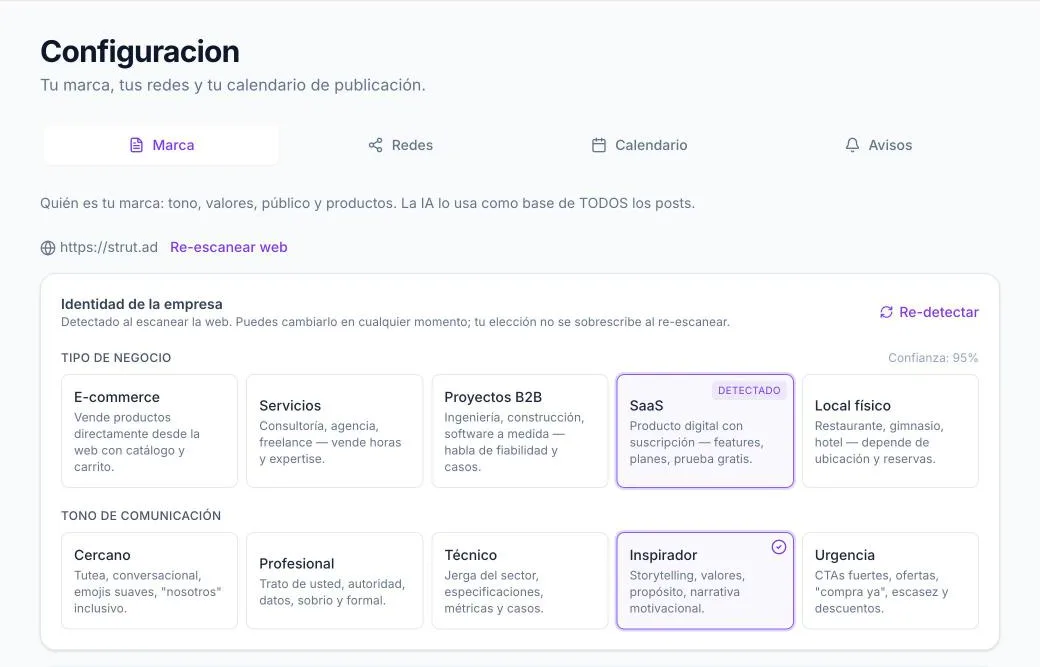
Using the text of your website, a language model classifies the business into one of five types (online shop, services, B2B projects, subscription software or local business) and the tone into one of five (friendly, professional, technical, inspiring or urgency). Each label carries a confidence from 0 to 1.
- If the confidence does not reach 0.5, we do not show the guess: the label stays as "unknown" and we ask you to choose it.
- If the model is unavailable, we use deterministic rules: the site’s structured data, the number of products, keywords, the balance between informal and formal address, emoji and technical jargon. By design these rules never exceed a confidence of 0.6.
- Anything you set by hand is never overwritten on a re-scan.
The 42-field brand profile
A second model reads up to 6,000 characters of your website and fills in a structured profile. The core instruction it receives is literal: "Do not make things up. If the website does not say it, leave the field empty." That is why you will see blank fields and a counter like "24 of 42 filled in": we prefer a gap to a false fact.
| Block | What it captures |
|---|---|
| Commercial | Business model, what generates revenue, priority and highest-margin offers, customer segments, purchase triggers, objections, proof, conversion goal, conversion paths, pricing model, way of selling. |
| Identity | Purpose, value proposition, audience, sectors, geographic scope and countries, year founded, team size, certifications, positioning, flagship clients, social presence, languages. |
| Offer | Key products or services, differentiators, unique selling points. |
| Content | Topics, pain points you solve, emotional hooks. |
| Voice | Personality, voice examples, vocabulary to use and to avoid, banned words, call-to-action patterns, visual cues, emoji usage (none, sparing, moderate or abundant), narrative hooks, community terms, commercial calendar dates. |
Each text field is capped at 400 characters and each list at 8 items. Your manual corrections are kept even if you scan again.
How we build the context the AI receives
A language model writes well when it knows what is binding and what is merely background. That is why the context of each post is not one long text: it is nine ordered layers, and each one has a rank.
The nine layers, from the strictest to the softest
| Layer | Name | What it contains |
|---|---|---|
| T0 | Hard format | The exact schema of the response, the requirements of the content type (text, image, video) and the global instructions from the Strut.ad team. It goes at the end of the prompt, which is where the model pays most attention. |
| T1 | Guardrails | Banned words, vocabulary that must not be used, emoji policy and, always, the language to write in. |
| T2 | Essence | Purpose, value proposition, audience, sectors, type and model of business, segments, geographic scope and positioning. |
| T3 | Voice | Personality, tone, languages, own vocabulary, community terms, voice examples and emoji usage. |
| T4 | Assets | Products and services, differentiators, certifications, flagship clients, priority and margin offers, proof, pricing, way of selling and conversion path. |
| T5 | Content guide | Topics, pain points, emotional hooks, call-to-action patterns and what we learned from your performance metrics. |
| T6 | Conditionals | Narrative hooks, commercial calendar dates and the visual brief, only when they exist. |
| T7 | From this call | Target date, market, what you asked for on this post, the temporal context (campaigns and holidays) and the chosen creative direction. |
| T8 | Background | The prose of your website, creative notes for the network, recent approved and rejected examples, and fragments of your documentation. It is labelled "factual detail, not directives": if it contradicts the layers above, it is ignored. |
Who wins in a conflict
Language
If your profile documents languages, we write in the first one. If not, the instruction is explicit: Peninsular Spanish, never Latin American Spanish or English.
Temporal context: campaigns and holidays
We maintain a global calendar of temporal contexts (sales, back to school, Black Friday, Christmas, public holidays) by region. It is chosen by your market, not by assumption:
- If your profile has country codes, we use the contexts of those countries.
- If not, but the geographic scope describes Spain, we use the Spanish context.
- If the scope describes another country with no code, we apply none: better no context than the wrong holidays.
What you approved and what you rejected
For each network we take up to 3 approved and 3 rejected examples from your recent history, trimmed to 100 characters each. The instruction for the approved ones is to keep only the rhythm and the level of concreteness, and never to reuse the topic, the wording, the opening or the claim. The rejected ones are shown as traits to avoid.
Your documentation (RAG)
The PDFs, Word files and texts you upload, together with the text of your website, are chunked and indexed so the relevant fragments can be retrieved for each post.
| Chunks | Around 500 tokens (roughly 2,000 characters) with a 50-token overlap, so ideas are not cut in half. |
|---|---|
| Index | 1,536-dimension embeddings plus a Spanish lexical index. The two are combined by rank fusion, so a search finds both synonyms and exact terms. |
| Retrieval | The 5 fragments most relevant to the creative direction of the post: a piece about a specific offer retrieves the documentation for that offer, not "generic marketing". |
| Scope | Strictly per company. One of your companies cannot read another’s documents. |
Two modes: "More on-brand" and "Freer"
When you ask for a new version you can loosen the voice. The freer mode omits the voice (T3), learned patterns (T5) and conditional (T6) layers, but always keeps the format, the guardrails, the essence of the business, the commercial assets and your request. Being freer never means using a banned word.
How we avoid repeating ourselves
The classic problem with automated content is that everything sounds the same. Before writing, we deliberately choose an angle different from your most recent pieces.
We load the 18 most recent pieces from your company on that network, including valid drafts you never approved, and use them as evidence of what has already been said, never as examples to imitate. Then we rotate twelve dimensions:
| Dimension | Options |
|---|---|
| Goal | Reach, educate, build trust, answer an objection, consideration, conversion, community, retention. |
| Angle | A specific customer moment, behind the scenes, mistake and fix, unexpected detail, a firm point of view, hands-on demonstration, myth and reality, decision guide, process laid bare, before and after. |
| Hook shape | 7 different ways to open. |
| Proof mode | 6 ways to back up what is claimed. |
| Call to action | 6 modes, including having no explicit one. |
| Visual treatment | 8 treatments for the image. |
| From the profile itself | Commercial focus, topic, audience, known objection, available proof and conversion path, taken from your brand profile. |
For each dimension we pick the least-used option in your history, additionally penalising whatever appeared in the 5 most recent pieces. Ties are broken reproducibly from the post identifier, so the choice is inspectable and is stored alongside the result.
Originality contract
Copy, image and video
Three pieces, three different engines, the same brand profile behind them.
The copy
- A language model with a structured response format, so that each field (copy, hashtags, hook, image brief and voice-over line) arrives separately and nothing has to be guessed out of a blob of prose.
- The model also receives your logo and product photos as visual reference, so that when it mentions a product it talks about one that exists. If the provider rejects the images, we retry once without them.
- Different copy per network: the Instagram template is not the LinkedIn one, nor the X one. There are six templates: Instagram, Facebook, LinkedIn, TikTok, X and a generic one for the Starter plan.
- The system instruction asks it to write as that company’s in-house copywriter, with judgement, not as a content generator.
The image
- An image model, at medium quality. When there are valid product photos we use the edit mode on them, so the image resembles your catalogue rather than a stock generic.
- Sizes per network: landscape 1536×1024 for X and LinkedIn, portrait 1024×1536 for TikTok, square 1024×1024 for Instagram, Facebook and the generic post.
- An explicit instruction not to draw text, letters, numbers or watermarks: AI-generated text comes out misspelled. Your logo is never sent to the image model, so it cannot redraw it; it is placed afterwards.
- Up to 3 attempts if the provider fails. If there is still no image, the post is flagged and never auto-approved: a person will always see it.
- Every image is verified (integrity, minimum resolution, aspect ratio) before being stored.
The generic Starter post
On Starter a single piece is generated with its own template (copy up to 400 characters and 0 to 3 hashtags, square image) which, once approved, is sent to all your connected networks, recalculating limits and options for each target network.
The video (Studio plan)
A reel is not requested in one go. It passes through four stages before a cent is spent, and you can stop it and read it in between. They are separate on purpose: whoever writes the message and whoever decides where the camera goes are chasing different things, and asking one model for both is what produced incoherent videos.
1. What the system knows before writing
- The same brand context your post copy gets: the guardrails, essence, voice and assets layers. The video writer used to receive four hand-picked fields, and it showed — it wrote slogans where the copy wrote sentences with texture.
- What makes you money, taken from your own site: your highest-margin products, what you want to push now, what drives your revenue, your differentiators, the proof you can show and what counts as a conversion for you.
- Your measured sales, where we have them attributed. It is the evidence that weighs most: it describes money, not attention.
- What has already worked on your own posts: the hooks that retained, the patterns your best reels repeat, the ones that underperformed, and the real share of the time your videos are watched to the end.
- What you yourself have corrected in earlier reels. It is the most valuable signal there is, because you said it looking at the result. Can be switched off in Settings → Networks.
- Concrete facts from your catalogue and the editorial rotation, so two reels in a row do not tell the same story the same way.
- The approved post, which is the ASSIGNMENT and not a starting point: same topic, same angle, same example. The reel puts it on screen; it does not write a different ad.
2. The format: what kind of video this is
The writer picks one of four formats and shoots the whole reel in it. It used not to pick at all: it drifted to voice-over-over-b-roll, 45% of all scenes, which is simultaneously the hardest format to make interesting and the hardest to render meaningfully.
| One person talking to camera | Someone looks at you and tells you ONE concrete thing: a feature, a mistake everyone makes. The default, the most reliable, and the only one that really carries a hook. |
|---|---|
| Someone using it day to day | A customer in their real place, and the exact moment this saves them something. The benefit is seen happening, not explained. |
| The problem and the relief | Opens on the uncomfortable moment and turns towards calm. The person lives it on screen. |
| The product up close | The object is the subject. Only offered to businesses with something physical to show: software has no demonstration to give, and asking for one anyway is what produced coloured pieces on blank tiles. |
The format is enforced, not suggested: the first scene takes its audio mode, because a hook only lands if someone says it looking at you, and a scene using an audio the format does not is brought into line — a voice-over inside a piece to camera reintroduces the invisible narrator the format exists to avoid.
3. The script: what gets said
- Up to 6 scenes, 1 to 15 seconds each, capped at 30. The reel lasts the sum of its scenes — the script decides, not a fixed number.
- The whole reel shares a "fixed setting" — same place, same person, same clothes, same light — repeated in every scene brief. Without it, each shot looked like it came from a different video.
- Words rule the clock: speech runs at about 2.6 words per second and every spoken scene reserves one more for starting, landing and absorbing the dissolve. Without that margin the last word is cut.
- A second model reviews the script and rewrites it once if the opening does not hook, if two scenes say the same thing, or if continuity breaks. Reviewing text costs nothing; shooting does.
4. The treatment: how each scene is filmed
Here the script stops being prose and becomes a sheet per scene. Not a word of what is said changes: what is decided is how it has to look for that line to work.
- Per scene: shot size, camera height and angle, whether it moves or holds, where the light comes from, who appears and in what clothes, what they do with their hands and body, where they look, what objects are in frame and what links it to the scene before.
- The gaze is checked against the line. If the words are about something on a screen, a phone or a product, the system verifies the subject is looking there and corrects it if not. Someone describing what they see on a computer without looking at it is a filming error, and it is caught before any money is spent.
- Some things this kind of model cannot film, so they are never asked for: transformations. Putting something inside something else, folding, wrapping, closing a lid. It does not reason about volumes. If the script needs that moment, it is shot already done: the closed box in someone's arms, not the act of closing it.
- Nor is a scene solved with abstract mime — tiles, blocks or coloured pieces standing in for an idea — and text is never the subject of a shot. Devices can appear with their screen turned away or out of focus.
5. You can read the script before it is filmed
An option in Settings → Networks. With it on, generation stops after writing the script and shows it to you: the chosen format, the scenes, what each one says and how long it runs. Nothing is filmed until you approve, and your video allowance is not spent while it waits. Reading costs nothing; filming does. It only applies to posts that already go through your review: one that auto-publishes has nobody to approve anything.
6. The shoot, and what is checked along the way
- Scenes are not shot separately: the first starts from the post image and each of the rest is requested as a continuation of the previous one, so the reel is a take that moves forward.
- For businesses with a photographed physical product, the scenes where the product is the subject start from YOUR real photo instead of inheriting the previous shot. An extension is a copy of a copy, and without this what appeared late in a reel was the model's impression of your product.
- Every scene is reviewed as it arrives: one frame is inspected against what was asked for, looking for four specific failures — not what was asked, impossible physics, generic objects standing in for the idea, or illegible text. A rejected scene is filmed ONCE more.
- Once on purpose: the reviewer can be wrong, and retrying in a loop would spend your monthly allowance arguing with itself. If it cannot be inspected it counts as fine: an outage is not evidence of a bad shot.
- If a scene fails outright mid-chain, the reel ships with the ones that worked and is flagged as incomplete. The earlier ones are already paid for.
7. The edit and the finish
- The provider returns only the new segment of each extension, so the edit is ours, with ffmpeg and a short dissolve between scenes. Each scene also remains an independent file, which is what makes redoing only part of a reel possible.
- The audio is levelled to -16 LUFS, the same level the platforms normalise to. Each scene arrives at whatever volume it was generated at — we have measured -11, -20, -37 and -12 dB inside one reel — and without levelling it sounds like fragments glued together even when the shots match.
- If a scene with no speech comes back completely mute, a very low bed is laid under it so the sound does not cut dead mid-reel.
- Background music: you upload your own tracks and we run them underneath, ducked when someone speaks. With several uploaded, the script picks the one that fits each video. Without any, the reel ships without music: the licence is yours, which is why this is an upload and not a library we ship.
- Burned-in captions, on by default. Reels are watched muted most of the time. We do not ask the model for them — it writes text illegibly — we write them from the exact words of the script and the real timing of each shot in the finished edit.
- A fixed brand voice, off by default. Without it a different voice narrates every video. It only affects voice-over: when someone talks to camera their own voice is kept, or the lips stop matching.
- Logo, on by default, composited with ffmpeg onto the finished video. The model never draws it. You can remove it if you prefer an unbranded video.
- The whole finish is optional and fail-safe: if any of these steps fails, the reel ships anyway. None of them can discard scenes that are already paid for.
8. If you do not like it, what you can change
Four levels, shallowest first, because "regenerate the video" used to be the only control: disliking the camera in one scene cost an entirely new script.
| The topic | Everything is redone: what the reel is about, what it says and how it is filmed. |
|---|---|
| The script | Keeps the topic and rewrites what is said and in how many scenes. |
| The shots | Keeps the script word for word and redoes only camera, light, gaze and objects. For when the message is right and the picture is not. |
| One scene | You write what to change in one scene. Since each scene continues the previous one, that scene and the ones after it are redone; the earlier ones are kept. Editing the last of six costs one scene; editing the first costs the reel. We state the cost before you confirm. |
| Format | Vertical 9:16 reel, 720p, 1 to 30 seconds as the script requires, with narration in your brand language. |
|---|---|
| How long it takes | Each scene is a full generation, so a six-shot reel can take several minutes. You can close the page: when you come back you will see which shot it is on. |
| The brief, visible | In the preview you can read the exact prompt sent for each scene, with its duration, its audio mode and whether it started from your real photo. |
| Technical verification | With ffprobe, scene by scene and again on the finished reel: that there is video, 9:16, the right duration, an audio track and an intact file. |
| Retries | At most 2 attempts per scene and 2 concurrent renders system-wide. If the network drops while we are waiting on a shot that was already accepted, we resume waiting instead of ordering it again: it is already paid for. |
| If the first frame fails | The reel is generated from the text anyway and flagged for you to review; it is still publishable. |
Quality control before you see it
Two different filters. The first is deterministic and uses no model at all: concrete rules on the copy. The second is a vision model that looks at the finished image or video.
Filter 1: the copy
It runs on every draft and checks, among other things:
| Check | Criterion |
|---|---|
| Repetition | Similarity to your recent history at or above 0.72 on the body, or 0.82 on the opening. The visual concept is compared too. |
| AI clichés | 16 patterns, such as "in an increasingly … world", "it is not just about …", "discover the power of …", "take … to the next level", "did you know that …", "make a difference". One strong cliché, or any two, blocks the draft. |
| Internal labels | Lines starting with "HOOK:", "CTA:", "CAPTION:", "GUION:" and the like, which sometimes leak into the copy. |
| Banned vocabulary | Your banned words and your "do not use" vocabulary, matched on whole words. |
| Emoji | If your profile says "none", a single emoji blocks it. |
| Made-up figures | Any number with a unit (%, €, customers, years, hours, days…) that appears neither on your website nor in your documentation. |
| Network shape | Required fields present; on X, every tweet 280 characters or fewer. |
| Synthetic visuals | Image briefs with two or more devices out of "poster", "infographic", "collage", "floating icons", "holographic interface" or "futuristic dashboard". |
| Video | Voice-over present in the spoken scenes, within what fits their length, and consistent with the script. |
A failing draft gets exactly one corrective rewrite, which includes the rejected draft and the reasons and asks it to start from a materially different observation and opening. If the second version fails too, the post is flagged as quality-failed, no image or video is bought and you will see it with a red notice so you can decide.
Filter 2: the image and the video
- Photos: one call to a vision model per image, with up to 2 reference images from your brand. It returns a verdict (pass, fail or review), a summary, up to 6 visible observations, consistency with the copy, technical quality, safety and brand resemblance.
- Without brand references, resemblance stays "not assessed" and can never cause a failure.
- Reels, scene by scene: as soon as a scene finishes rendering, one frame is inspected against what was asked for, looking for four specific failures — not what was asked, impossible physics, generic objects standing in for the idea, or illegible text. A rejected scene is filmed once more, and only once: the reviewer can be wrong and retrying in a loop would spend the monthly allowance.
- Reels, once edited: frames are sampled across the WHOLE reel, not just its opening, and the audio is transcribed without giving the script as a hint. The transcription must cover at least 80 % of the approved voice-over and end on the same words. Only the spoken scenes are expected to be heard: an ambient scene has no text to transcribe.
- None of these reviews is retried, and none generates another paid video.
Three possible outcomes, and we keep them apart
Review, versions and changes
Nothing is published without passing through your inbox, unless you turn on auto-approval on a paid plan.
Approve, edit, reject
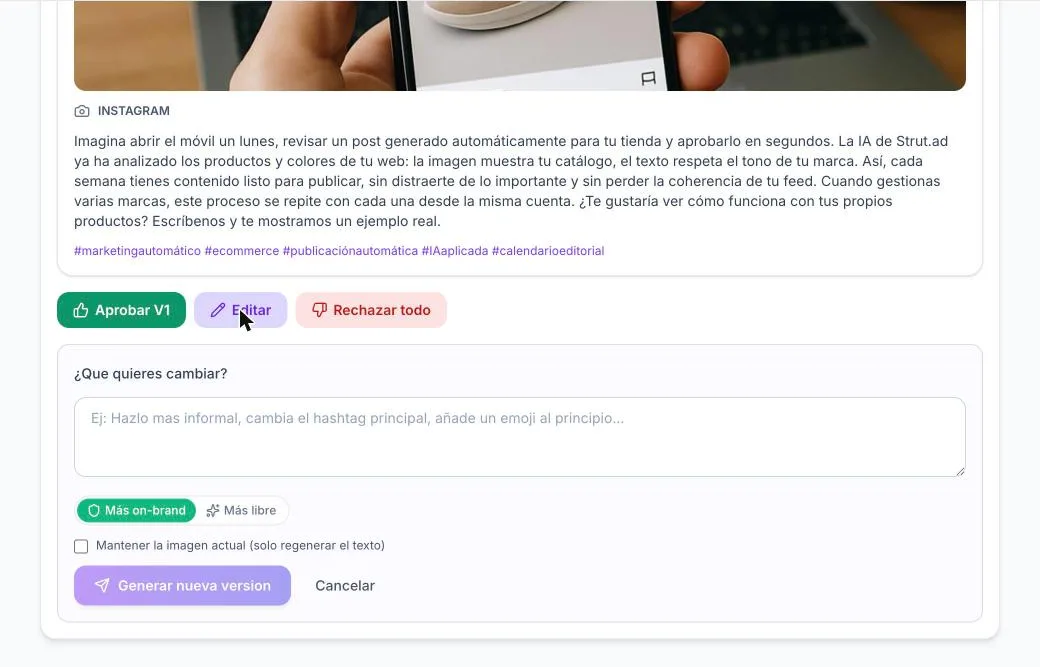
- Approving publishes the chosen version and discards its pending siblings. The calendar slot moves to approved and publishing is queued. If the network rejects the post, it stays approved and you can retry in one click.
- Rejecting closes every version of the post and its slot in the calendar. The generation already happened, so the quota is not refunded.
- Editing the copy by hand marks the piece as edited and invalidates its previous visual review. An already approved piece cannot be edited: a new version is created instead.
Asking for a new version
You write what you want changed in your own words and the AI generates another version. Each new version consumes a "re-creation", not a generation. With 1 re-creation (Starter) you get 2 versions to choose from; with 3 (Pro and Studio), up to 4.
| Keep the image | Optional. If you keep it, it is attached as a reference and the new copy must respect the names, words and numbers visible in it. |
|---|---|
| Keep the video | On by default, the opposite of the image: re-rendering a reel costs a quarter of the monthly cap. If you keep it, the voice-over and the script are preserved word for word and only copy, hashtags and hook change. |
| Which part of the video to change | If you do choose to film it again you pick the level: the topic (everything is redone), the script (keeps the topic), the shots (keeps the script word for word and redoes only camera, light and gaze) or one specific scene. Since each scene continues the previous one, changing one redoes that scene and the ones after it and keeps the earlier ones: we tell you how many will be filmed again before you confirm. |
| Unticking the video also regenerates the image | They go together: the post image is the reel's first frame, so a new video needs a new frame. |
| More on-brand / Freer | Choose whether the new version follows the voice and the learned patterns to the letter or is allowed to stray, always within the guardrails. |
Auto-approval
Two conditions must hold at once, or it does not happen:
- The plan allows it (Pro or Studio) and you have turned it on in the calendar rule. On Starter everything goes through review.
- No piece of the post has a failed image, a failed video, failed quality control, a lost first frame or a pending visual review. Any of those flags forces human review.
Calendar and publishing
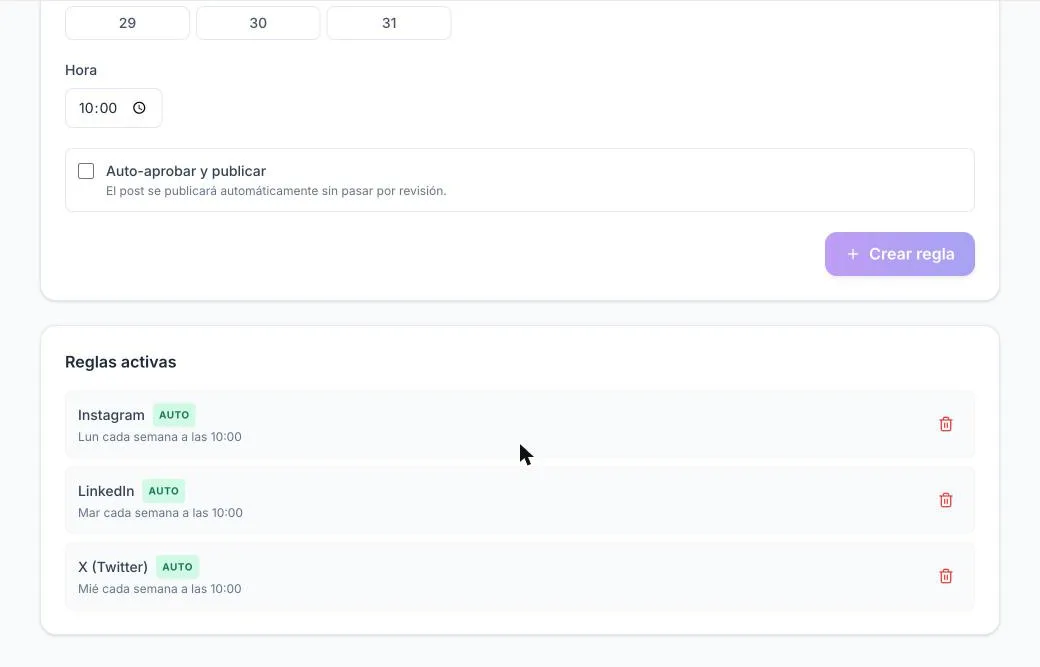
You define one rule per network and the system takes care of generating ahead of time, waiting for your approval and publishing at the exact hour.
The rules
| Frequencies | Weekly, fortnightly (on even or odd weeks) or monthly (day of the month 1 to 31, clamped to the last day in short months). |
|---|---|
| Lead time | By default the post is generated 7 days before its publication date. You can change it in Calendar. |
| Time zone | All times are mainland Spanish time (Europe/Madrid), in the calendar, in publishing and in notifications. |
| Starter | No calendar rules: it is a single generation you launch yourself, published to every connected network. |
| Pro and Studio | Up to 5 rules, one per network: Instagram, X, LinkedIn, TikTok and Facebook, at any frequency. |
What the system does every minute
- Every 60 seconds it reviews the rules and launches the generations that are due.
- Every 5 minutes it checks stuck posts against the provider and recovers generations hung for more than 30 minutes, refunding their quota.
- Every 15 minutes it launches the metrics sweep (see the performance section).
- If a generation fails, it is retried up to 3 times. If there is no quota left, the entry stays scheduled with the reason visible and is retried when the period rolls over. No post is lost silently.
Publishing
We publish through PostForMe, a provider authorised by each network, with the minimum permissions: publish and read the feed. Your images and videos are uploaded to the provider’s signed addresses; we do not expose your media at any public URL.
| Network | Copy limit | Hashtags | Options |
|---|---|---|---|
| 2,200 | 30 | Image in the feed; videos as Reels, also shared to the feed. | |
| 2,200 | 5 | Image on the page; videos as Reels. | |
| TikTok | 2,200 | 10 | Public, with the AI-generated content disclosure turned on and automatic music on images. |
| 3,000 | 5 | Native video attached. | |
| X | 280 per tweet | 3 | Threads when the copy requires it. |
Hashtags are only added if the copy still fits with them; otherwise the body is trimmed to make room. A video’s script is never used as the post copy: the audio already carries it. And if a post is already published or queued on a network, it is not sent to that network again.
Telegram and WhatsApp notifications
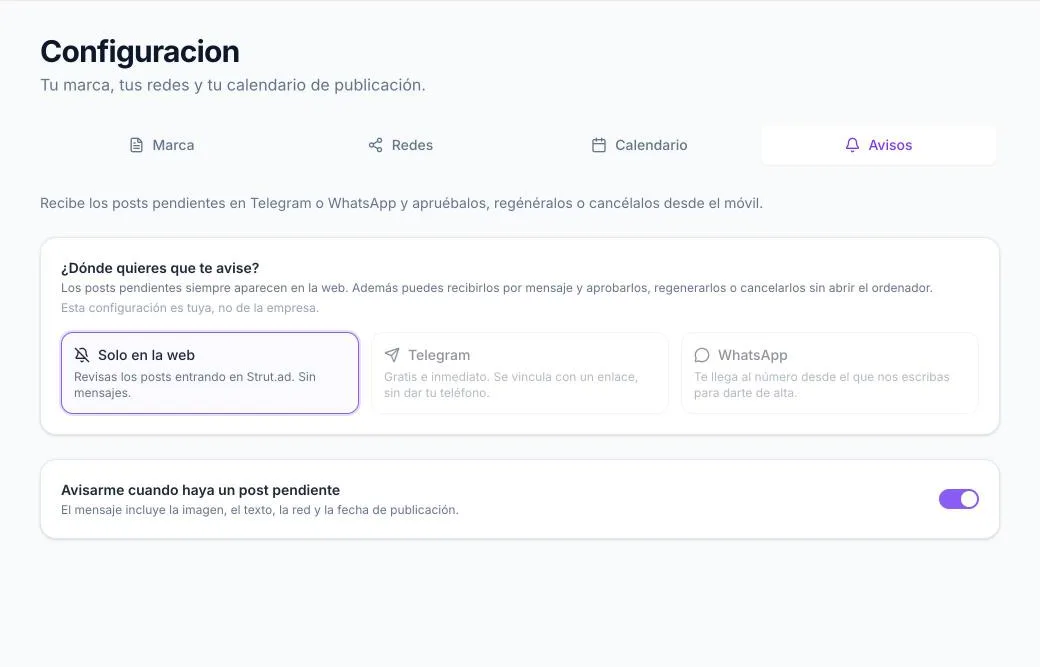
Pending posts are always on the web. On top of that, you can receive them on your phone and decide from there.
- The setting is yours, not the company’s: one person, one channel, even if they manage several brands.
- You get one message per post, with the image or the video, the copy, the network and the publication date, and three buttons: Approve, Regenerate and Cancel.
- Regenerate asks before spending: it checks that you have re-creations left, asks you "What would you like to change?" and your next message is the instruction. A casual reply never consumes a re-creation by accident, and the same instruction cannot be consumed twice.
- The actions from your phone are exactly the same as from the web: they go through the same code, so approving from the phone publishes just the same.
Telegram
Free and immediate. You link with a single-use link that expires in 10 minutes, without giving out your phone number.
- You opt in by sending a message with a code from your own WhatsApp. That message is the consent Meta requires, and you can opt out by writing BAJA.
- Meta only allows free-form messages in the 24 hours following your last message. Since posts are weekly, we almost always use Meta-approved templates, with the image or the video in the header and the three buttons.
- Inside that 24-hour window, the message goes out free-form with the full copy.
How we measure performance and learn from it
We read the real metrics of your accounts, compare every post on equal terms and distil what recurs among the best ones. With strict rules so we do not learn from noise.
Where the data comes from
- From the feed of each connected account, which is the only source that carries metrics. It requires the feed-read permission at connect time; accounts connected before this feature must be reconnected.
- The feed includes your own organic posts, not just ours. For a newly connected company they are the only signal, and the most valuable one.
- The sweep runs every 15 minutes, but each account is synced at most once every 20 hours, in batches of 25 accounts, looking 45 days back. We keep a daily snapshot of every post for 90 days and a weekly one after that.
Which metrics we store
Impressions, reach, views, video plays, likes, comments, shares, saves, clicks, watch time, completion rate and the retention curve. Each network reports them differently, and we normalise with two rules that look minor and are not:
- "The network does not report it" is not "zero". A missing value is stored as missing.
- Every rate records its denominator (impressions, reach or views). Without that, comparing rates across networks means nothing. And the units differ: watch time is in milliseconds on Instagram, LinkedIn and Facebook, but in seconds on TikTok.
The engagement signal
Formula
The click weighs more because it is the signal closest to commercial intent that exists on every network. The engagement rate is that sum divided by the network’s denominator.
How we score each post
| Same age | Every post is evaluated on its day-7 snapshot. That way a 3-day-old post does not automatically lose to a 60-day-old one whose counters had twenty times longer to run. |
|---|---|
| Minimum age | 48 hours: before that, engagement is still arriving and some networks delay their data. |
| Minimum audience | A post seen by 12 people with 3 likes is "25 % engagement" and pure noise. We require at least 100 on Instagram and Facebook, 50 on LinkedIn and 200 on TikTok and X. |
| Comparison | A robust score (median and median absolute deviation) per company and network. We never compare your company with another, nor Instagram with LinkedIn. |
| Own baseline | It needs at least 5 comparable posts; below that we use a global reference and say so. |
| Video | Completion and watch time weigh 65 %; surface engagement, 35 %. |
| Recency | Only as a tie-breaker, with a 45-day half-life. It is not the engine. |
From the numbers to the lessons
At most once a week (or when 3 new pieces appear) we analyse the last 90 days. Every calculation is done in code; the language model only writes the qualitative sentences from them. The result is stored as a performance profile that feeds layers T5 and T6 of the context and the reel playbook.
Learning guardrails
- We never state a pattern from fewer than 5 posts. With 300 followers, a rule drawn from three posts is worse than silence.
- Examples of winning posts are stored and shown to the model with their first 200 characters only. The truncation is the anti-plagiarism mechanism.
- Our own posts take up at most half the example slots when you have organic ones. Otherwise the system learns from its own output and the voice converges on the model’s average.
- From the visuals we distil recurring traits; we never recycle winning briefs, because that ends up publishing the same photo four times.
- Three switches: "Use in generation" on Performance, dismissing a specific pattern, or asking for a "Freer" version.
Sales attributed to each post
Engagement is not revenue. If you want to know which post sold, you can connect your commercial data and see it per post and per network, without mixing currencies.
- One link per post and network: We build a URL with campaign parameters (source, medium, campaign, content) and an identifier of our own, pg_attribution, which your website keeps all the way to the order. The link is stable: repeating it is idempotent, and changing its destination is refused so past attributions are not altered.
- A code snippet for your website: A 65-line script, with no dependencies, that makes no network calls. It stores the identifier in the browser session and adds it to your checkout or contact forms. It is conditional on consent: without it, it clears what it stored.
- You send us the events: Sale, booking, qualified lead or refund, from your server, from Make or Zapier, or by CSV import. Each event carries your own identifier; repeating it with the same data is recognised as a duplicate, and with different data it is refused.
- You see the result per post: Revenue, gross margin, recorded cost and contribution, separated by currency, on the Performance page.
| Event types | Sale (with a positive amount), booking and qualified lead (with no amount: they never add to revenue) and refund (negative amount). |
|---|---|
| Refunds | A refund is a reversal of one specific sale: the amount is copied with the opposite sign, once per sale. Partial refunds are not modelled. |
| Money | Exact decimals with 4 digits, never floating-point numbers. Every summary is per currency; never a blended ROI. |
| Contribution | Attributed gross margin minus recorded cost, only when both are complete. The ratio per €100 of cost only exists if the cost is positive. Pieces with cost but no sales are counted separately, they do not disappear. |
| Integration credential | One per company, revocable, of which we store only its digest. A limit of 60 requests per minute and 64 KB per payload. |
| Use in generation | With 5 or more pieces with complete sales on the same network and currency, the generator can take into account which associations have sold. We do not claim causality, nor turn "not tracked" into "zero sales". |
Plans and quotas
One plan per company. Quotas are counted in a rolling 30-day window and reserved before spending, so the plan is never exceeded even if you launch several generations at once.
| Starter | Pro | Studio | |
|---|---|---|---|
| Price (excl. VAT) | Free | €20/month · €120/year | €199/month · €1,200/year |
| Generations per 30 days | 1 (once, does not renew) | 25 | 25 |
| Re-creations per post | 1 | 3 | 3 |
| Knowledge documents | 3 | 15 | 30 |
| Calendar rules | None: one manual generation | Up to 5, one per network | Up to 5, one per network |
| Content per network | One shared generic post | Tailored to each network | Tailored to each network |
| Video reels | No | No | 1 per network per week |
| Auto-approval | No | Yes | Yes |
| Automatic publishing after approval | Yes | Yes | Yes |
- The quota reservation is a single atomic operation in the database. If a generation fails, the quota is refunded; if the server restarts halfway through, it is refunded too.
- Video has its own quota because a reel is also a generation but its cap is lower. If it runs out, the network falls back to text with an image instead of breaking the scheduled post.
- Re-creations are read live from the plan configuration: if you change plan, the new quota applies immediately.
- Prices exclude VAT. Payment is handled by Lemon Squeezy as the merchant of record: it issues the invoice and adds whatever VAT your country charges. With an EU VAT number reverse charge applies and you pay the listed price. Only the company owner can subscribe or cancel.
Security and privacy
What we do with your data, and what we never do.
- Authentication is handled by Firebase (email and password, or Google). We do not store your password.
- We never ask for or store passwords for your social networks. You connect each account with the network’s official button and can disconnect it whenever you like. We request the minimum permissions: publish and read the feed.
- Every message reaching us from a provider (networks, payments, Telegram, WhatsApp) is verified cryptographically before we act on it. If the signature does not match, it is discarded.
- Your images and videos live on our server, under your company. When publishing they are uploaded to the provider’s signed addresses; there is no public URL for your media.
- Each company is isolated: profile, documents, history and learning are per company. One of your companies cannot read another’s data, not even within the same account.
- The website crawler validates every address before downloading it and limits the size and type of each file.
- You can delete your account from the app. The companies you own are deleted; if you are a member of someone else’s company, only your membership is removed. If you have history inside a company that is not yours, we ask you to transfer it first rather than destroy other people’s data.
What we do not do, and the limits worth knowing
We would rather tell you here than let you find out.
- The automated reviews are an aid to the editor, not a certification. Three frames do not guarantee the continuity of a video and a transcription can get it wrong. That is why you can always review before publishing.
- We do not read websites that block by IP reputation (some large portals with corporate protection), and we do not solve CAPTCHAs.
- The business metrics depend on you sending complete and correct events. There is no connection to your CRM until you set it up, and an absence of events does not mean zero sales.
- A video that is rendered and then rejected still consumes its quota: the provider has already generated it.
- The post copy is not modified automatically to include attribution links. On networks with no clickable links in the copy, the link has to go in your profile.
- The attribution we calculate is a subtotal of the pieces with recorded sales, not your company’s profitability nor a closed attribution window. It is no substitute for your accounting.
Want to see it with your brand?
Paste your website and in five minutes you have your first post to review. The Starter plan asks for no card.
I want my free plan · Strut.ad — Automated reels and posts for businesses and online stores